Transcription Mode
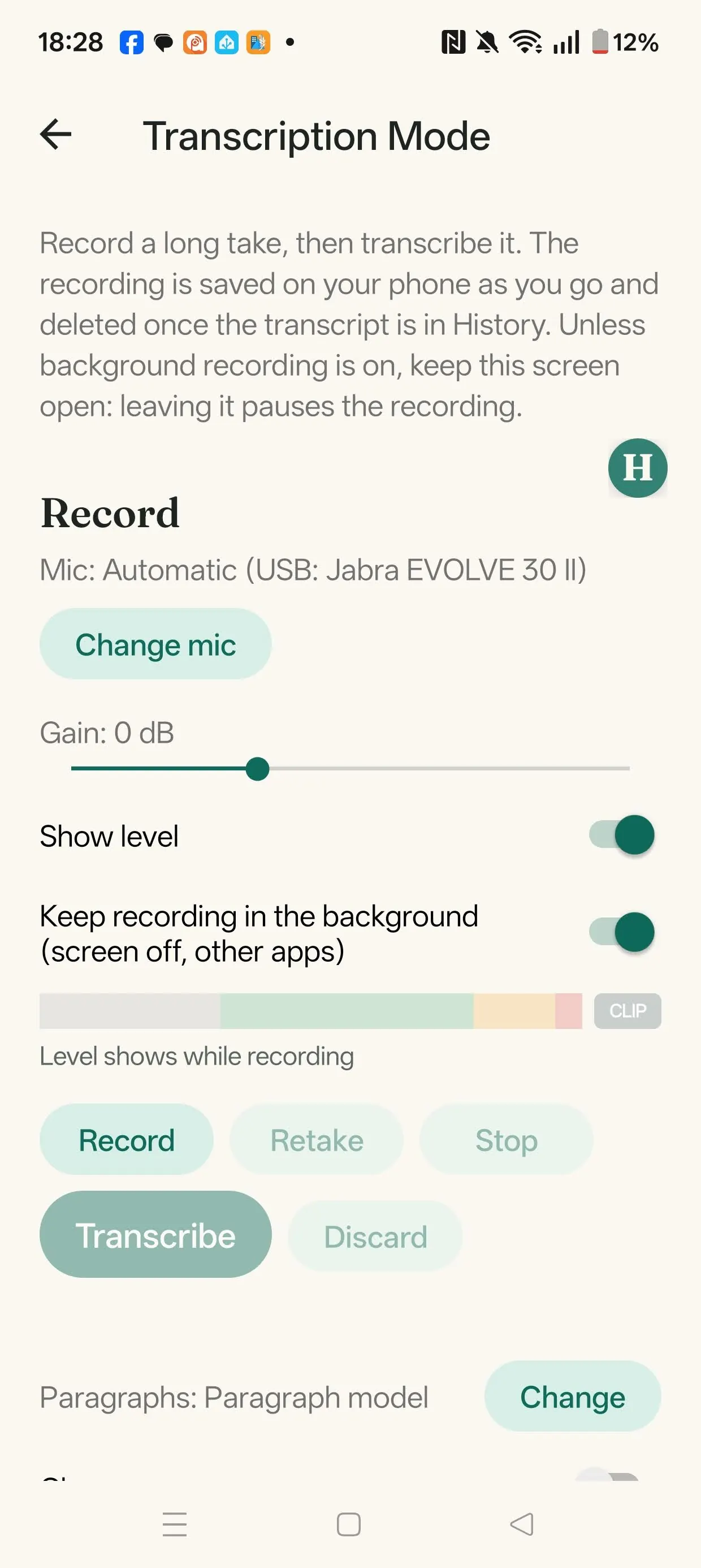
Record a long take, then transcribe it. The recording is saved on your phone as you go and deleted once the transcript is in History.
Record
Open Transcription Mode from the home screen, then use Record, Pause, Retake, Stop and Discard. Tap Transcribe when you're ready.
- Choose the mic with Change mic, set the Gain, and use Show level to watch the meter while recording.
- Unless Keep recording in the background is on, keep this screen open. With it on, the recording carries on with the screen off or in another app, and Android shows a notification with Pause and Stop.
- A recording that wasn't transcribed is offered again next time, with Transcribe it and Delete.
The transcript
The transcript lands in a text box you can edit. Another recording is added at the end.
Paragraphs: None, Time-based (a new paragraph about every 30 seconds) or Paragraph model (a small add-on that finds where paragraphs start, 34 MB).
Clean up tidies each finished transcript once (punctuation, numbers, slips) and sets it out in paragraphs, on the phone. Choose S1-mini by Superwhisper (recommended) or S1-ASR-Cleanup (experimental). It needs a phone with a newer processor (ARMv8.2 with dot product, roughly the last six years). If anything goes wrong, you keep the text as transcribed.
Save writes a Markdown file to a folder you pick with Folder…, in a folder for each day. With Give saved transcripts a title on and the title add-on downloaded, a small model writes a short title for the file name and heading.
Download these add-ons under Models → Add-on models, or when you turn the option on. They're best downloaded on Wi-Fi.